
Answer hints during live job interviews
Interview Agent listens to your call, picks up the interviewer's question and shows answer points within a couple of seconds. The points come from your resume, the job description and your notes on the company.
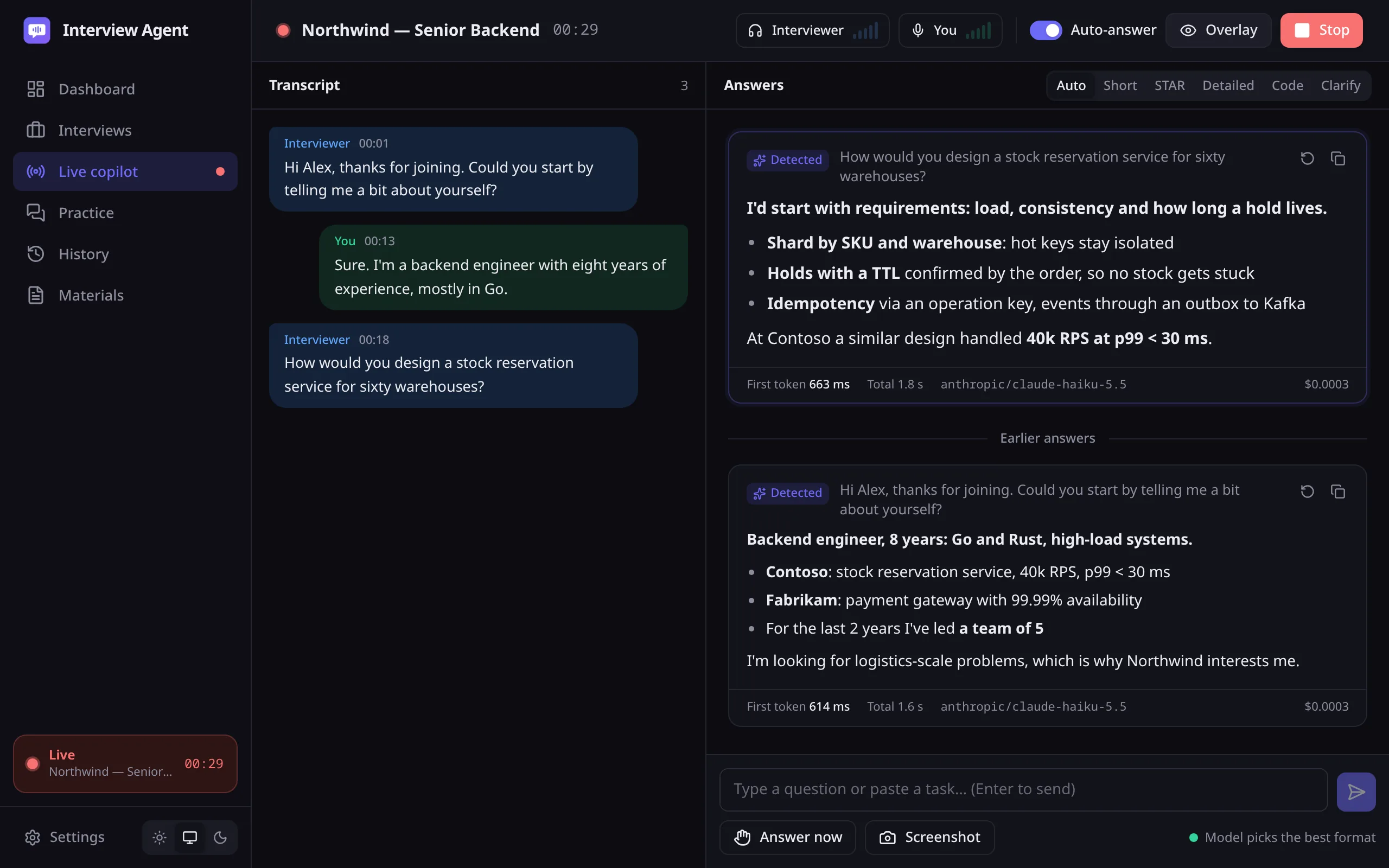
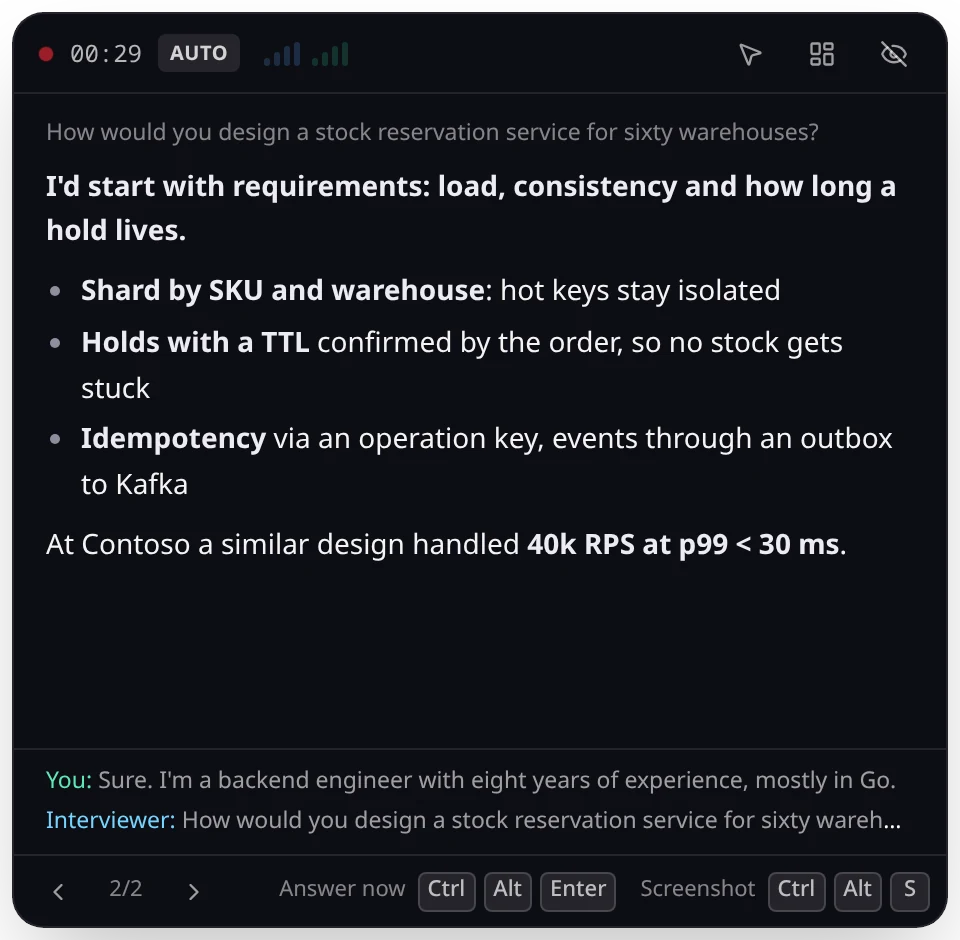
Main window Both sides of the transcript and hints for every question in the session.
Overlay The latest hint on top of the call. On Windows and macOS it stays out of screen sharing.
How it works
You don't press anything during the call.
Hears both sides
Audio from your speakers is treated as the interviewer, the microphone as you. A voice detector on your computer drops silence and noise, so only speech goes over the network.
Transcribes
Through the speech provider you choose. Terms from your resume and the job description are passed along up front, so names like Kafka and gRPC come out right.
Knows when the question is over
Usually after 650 ms of silence. If a sentence ends with a question mark, generation starts right away and updates if the interviewer keeps talking.
Shows the answer
The first line is something you can open with. Below it are 2–5 points from your own experience. The model doesn't add employers or numbers that aren't in your materials.
Six answer formats
The model usually picks the format. You can switch it mid-answer with CtrlAltK.
No need to read out a coding task or a diagram: CtrlAltS sends a screenshot to a vision model.
Tell me about a project you're proud of.
A zero-downtime billing migration: 14 months, a team of five.
- Moved 2 million subscriptions from the monolith to a separate service.
- Dual writes and a nightly reconciliation caught mismatches before customers did.
- No money-related incidents, and releases went from monthly to daily.
Why are you leaving your current job?
I want to work at a larger scale than my current product allows.
- The platform is stable now, and the work is mostly maintenance.
- You run at a load I haven't worked with yet.
- I'm leaving on good terms with the team.
Tell me about a conflict on your team.
Situation. Frontend and backend read the API contract differently, and a release slipped twice in a row.
Task. Get back on schedule without blaming anyone.
Action. The OpenAPI schema became the single source of the contract, with a generated client and schema checks in CI.
Result. The next six releases shipped on time.
PostgreSQL or MongoDB for a product catalog?
I'd pick PostgreSQL and keep the varying attributes in JSONB.
- Postgres: transactions across stock and prices, mature indexes, one database instead of two.
- JSONB covers product attributes without a schema per category.
- Downside: at hundreds of millions of SKUs you'll need sharding, which Mongo has built in.
Find two numbers in an array that add up to target.
Approach: a single pass with a value → index map.
def two_sum(nums, target):
    seen = {}
    for i, x in enumerate(nums):
        if target - x in seen:
            return seen[target - x], i
        seen[x] = i
    return None
Complexity: O(n) time and memory.
Design a news feed.
First I'd clarify the requirements.
- How many daily active users, and how many follows does a typical user have?
- Is the feed chronological or ranked?
- What delay is acceptable: seconds or minutes?
Preparation
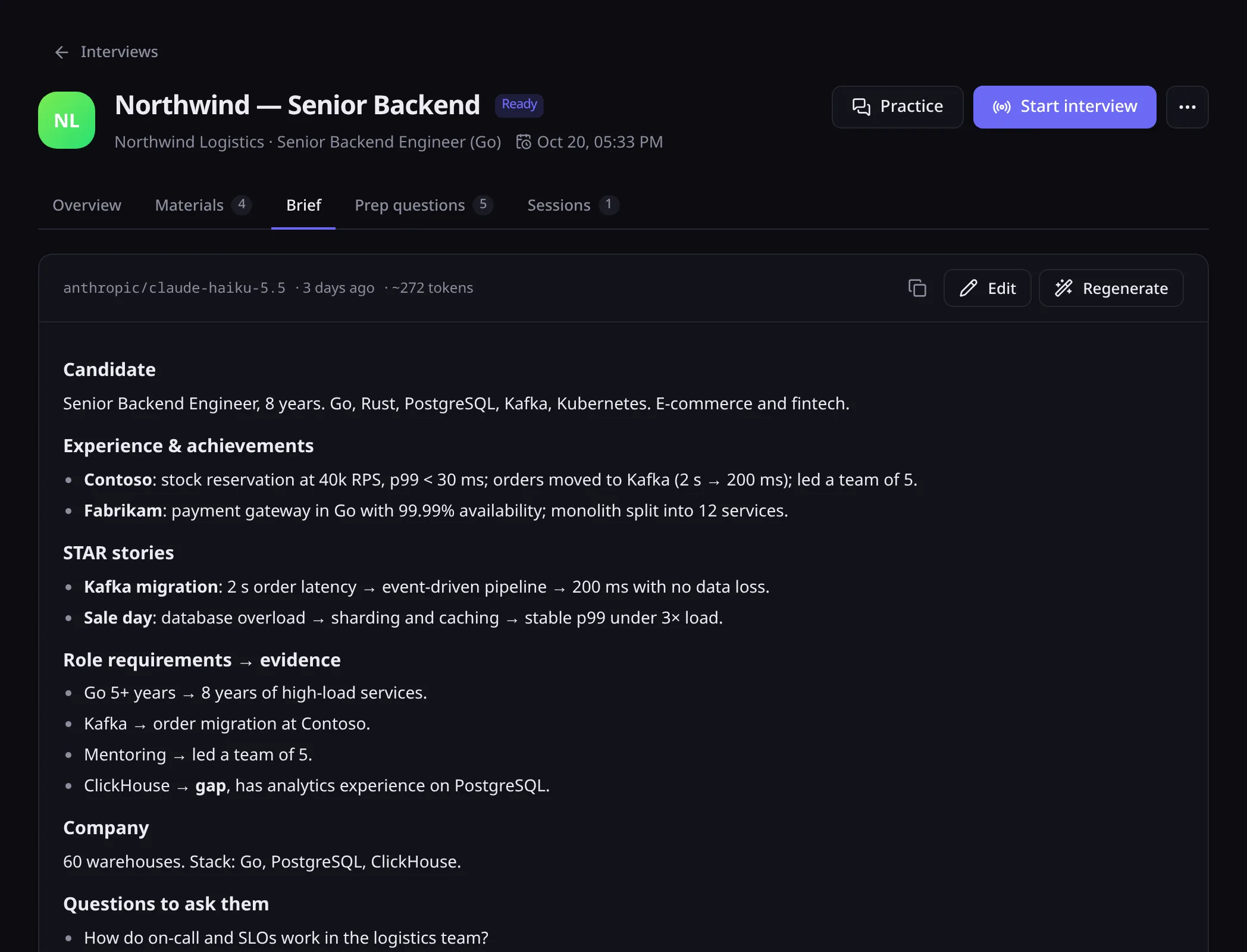
Materials. Your resume, the job description, the company website, notes and STAR stories. As a file (PDF, DOCX, Markdown and more), as text or as a link.
Brief. The model condenses everything into one page: your experience, your stories, how you meet each requirement and where the gaps are. You can edit the brief by hand, and it goes with every request during the call.
Practice. The app drafts 12–16 likely questions with answers and runs a spoken mock interview that scores each of your answers.
Review after the call
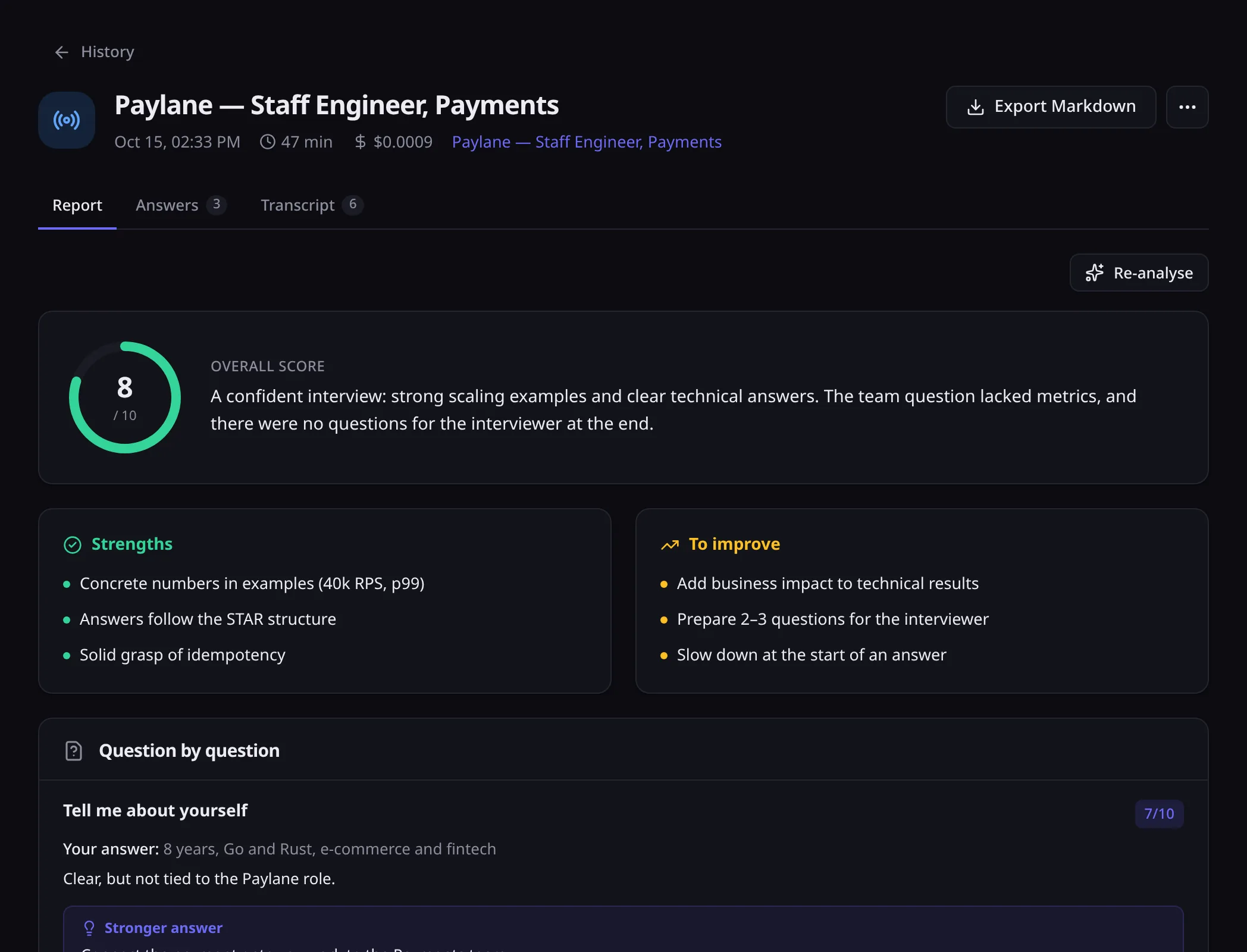
The whole session is saved: transcript, questions and hints. After the call the app scores the interview, points out what went well and what didn't, suggests stronger answers and drafts a follow-up email.
Reports export to Markdown, and search covers every session.
Hotkeys
They work while the call window is focused. Every shortcut can be changed in settings.
- Answer the last question
- CtrlAltEnter
- Send a screenshot to the model
- CtrlAltS
- Show or hide the overlay
- CtrlAltO
- Let clicks pass through the overlay
- CtrlAltX
- Stop the current answer
- CtrlAlt⌫
- Next answer format
- CtrlAltK
Data and privacy
Interview Agent has no server and no accounts, and it sends nothing to its developer. You can check that in the source code.
Stays on your computer
- Interviews and materials
- Resumes, briefs, transcripts and reports live in a local SQLite database.
- API keys
- In the OS keychain: Keychain on macOS, Credential Manager on Windows, Secret Service on Linux.
- Audio without speech
- Voice detection runs locally, and silence and background noise are never sent anywhere.
Sent to the providers you choose
- Speech from the call
- To your speech-to-text provider: OpenRouter, Deepgram or an OpenAI-compatible server.
- Question text and the brief
- To your language model provider, to get the hint.
- Screenshots
- Only on the hotkey, only to a vision model, capped at 2000 px on the long edge.
To keep the text on your machine as well, connect a language model through Ollama or LM Studio and run speech recognition on a local Whisper server.
Open source
Interview Agent is released under the MIT license. You can read the code, build it yourself, change it and use it in your own projects.
The core is Rust, the UI is React, the shell is Tauri 2. All five prompts can be overridden in settings without rebuilding.
# requires stable Rust, Node.js 22 and pnpm
$ git clone https://gitlab.com/homycoder/interview-agent.git
$ cd interview-agent/app
$ pnpm install
$ pnpm tauri build
Installers end up in target/release/bundle. For development, run pnpm tauri dev.
- crates/ia-audio
- System audio and microphone capture, voice detection
- crates/ia-stt
- Speech-to-text: OpenRouter, Deepgram, OpenAI-compatible APIs
- crates/ia-llm
- OpenAI-compatible chat client with streaming and fallback models
- crates/ia-engine
- Live sessions, practice, dictation, export
- crates/ia-context
- Import of files, job postings and company websites
- crates/ia-core
- Data models, prompts, end-of-turn detection
- crates/ia-storage
- SQLite and API keys in the OS keychain
- app
- React UI and the Tauri shell
Download
Version 0.1.0. Linux has prebuilt packages; on Windows and macOS, build from source for now.
| System | Interviewer audio | Overlay in screen sharing | Install |
|---|---|---|---|
| Linux x86_64, PulseAudio or PipeWire | Through a PulseAudio or PipeWire monitor | Visible, don't share that screen | |
| Windows 10 and 11, x64 | Captured with no setup | Hidden | Build from source |
| macOS 13 or later | Needs BlackHole or Loopback | Hidden | Build from source |
What you need. An API key. One OpenRouter key covers both language models and speech-to-text. A typical interview costs a few cents, and the app shows the cost of every answer. Other providers work too: OpenAI, Groq, Deepgram, and local models through Ollama and LM Studio. All versions and checksums are in the GitLab releases.
Questions
Can the interviewer see the overlay?
On Windows and macOS the overlay is excluded from screen sharing and recordings, so Zoom, Meet and Teams don't capture it. Linux has no such option, so don't share the screen the overlay is on.
Which call apps does it work with?
Any of them. The app records system audio instead of hooking into a specific program, so Zoom, Google Meet, Teams and browser calls all work the same way.
Could the model claim experience I don't have?
Hints are built from your resume, the job description and the brief. The prompt forbids adding employers or numbers that aren't in your materials. The prompt is open, and you can read and change it in settings.
Can the interview be in one language and the hints in another?
Yes. Interview language and hint language are set separately for each interview. Supported: English, Russian, German, Spanish, French, Ukrainian, Portuguese, Polish, Turkish and Chinese.
Can I use the code in my own project?
Yes. The MIT license allows use, modification and distribution, including in commercial projects, as long as the copyright notice is kept.